Step-by-Step Guide: How to Play TeraBox Videos Online in 2026
A TeraBox video can be frustrating when you only want to watch it, but the browser keeps buffering, fails to load, or asks you to use the app. You may not want to download a large file just to watch it once, especially when all you need is a quick online playback option. This guide shows how to play TeraBox videos online using a browser or our TeraBox Player. You’ll also learn how to play TeraBox videos online when playback stops, buffers, or does not start.
Can You Play TeraBox Videos Online?
Yes, most supported TeraBox videos can be played online without downloading the entire file first. When you open a working video link, TeraBox can load the video in its browser player, allowing you to start watching while the content streams. The experience can vary depending on the video link, internet connection, and device. If the video does not load or keeps buffering, the problem may be related to the connection or browser rather than the video itself. For a straightforward guide on how to play TeraBox videos online, you can use a browser or our TeraBox Player.
What You Need to Play a TeraBox Video
To understand how to play TeraBox videos online, you only need a few basic things: a working TeraBox video link, a supported web browser, and a stable internet connection. Public links can often be played without signing in, while restricted videos may require you to log in before watching.
Can You Play a TeraBox Video Without the App?
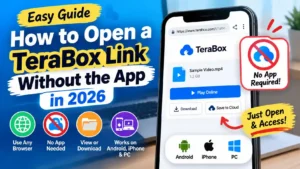
Yes, you can play supported TeraBox videos without installing the app. If TeraBox redirects you to the app instead of opening the video in your browser, our guide on How to Open a TeraBox Link Without the App explains how to access the link through the web version.
How to Play TeraBox Videos Online
Playing a TeraBox video online only takes a few simple steps. You can open the link in a browser or use our TeraBox Player when you want to watch the video without downloading it first.
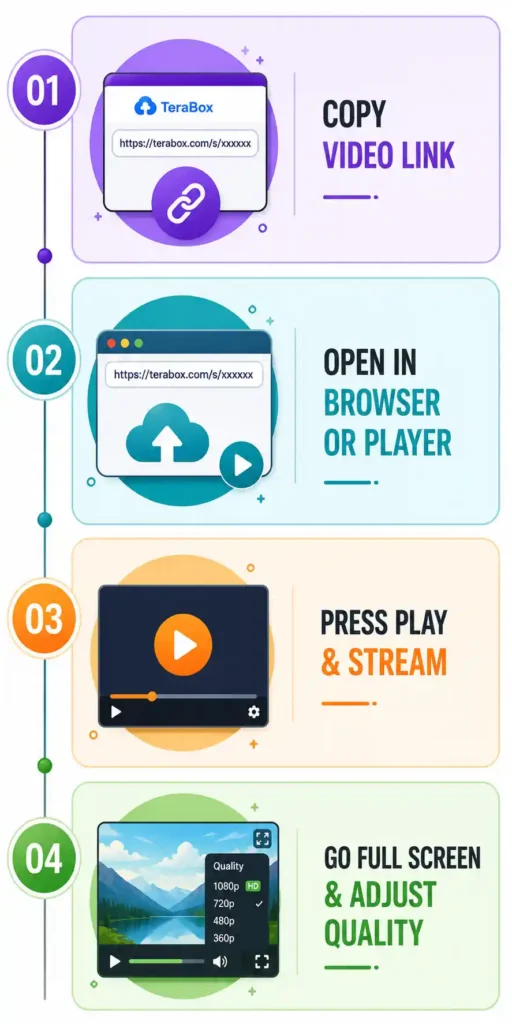
Copy the TeraBox Video Link
Copy the complete TeraBox video link as it was shared with you. Make sure no part of the URL is missing, especially if the link was sent through WhatsApp, Telegram, or another messaging app. An incomplete link may prevent the video from loading.
Open the Video in a Browser or TeraBox Player
Paste the link into Chrome, Safari, Firefox, or another supported browser and open it. You can also paste the link into our TeraBox Player to access the video through a browser-based player without installing the TeraBox app.
Start Playing the Video
Once the video loads, select the Play button to start streaming. The video may take a few seconds to begin, especially if the file is large or your internet connection needs more time to load the stream.
Adjust Playback and Full-Screen Options
Use the available player controls to pause, resume, seek through the video, adjust the volume, or switch to full-screen mode. If the player provides different quality options, choose a lower quality when your connection is not fast enough for smooth playback.
How to Play a TeraBox Video Without Downloading It
You can watch a supported TeraBox video online without saving the full file to your device. If you do not want to download the video or install the TeraBox app, you can use our TeraBox Player to watch it directly through your browser.
When Online Playback Is More Convenient
Online playback is useful when you only want to watch a video once or check the file before downloading it. Our TeraBox Player gives you a simple browser-based option, so you can watch the video without using your device’s storage for a large file.
When You May Still Need to Download the Video
Downloading makes more sense when you want to watch the video offline or keep it for later. It can also help when online playback keeps buffering because the downloaded file can be played directly from your device. If you decide to download the file, our guide on How to Download TeraBox Files explains the process.
How to Play TeraBox Videos on Android
If you’re looking for how to play TeraBox videos online on Android, you can use your mobile browser or our TeraBox Player.
Play a TeraBox Video in Your Browser
Open the TeraBox video link in Chrome or another supported Android browser. Once the video loads, use the browser’s player controls to start playback, adjust the volume, or switch to full screen.
Use the TeraBox Player
If the TeraBox page does not play the video properly or keeps redirecting you toward the app, you can use our TeraBox Player instead. It provides a browser-based way to watch supported TeraBox videos on Android without installing the official app.
How to Play TeraBox Videos on iPhone
For anyone searching how to play TeraBox videos online on iPhone, Safari is a simple place to start, with Chrome, Firefox, and our TeraBox Player available as alternatives.
Open the TeraBox Video Link
Tap the TeraBox video link to open it in Safari. If it does not open automatically, copy the link and paste it into Safari’s address bar.
Play the Video in Safari
Once the video loads, tap the Play button to start streaming. You can use the available controls to pause, seek, adjust the volume, or switch to full-screen mode.
What to Do if the Video Does Not Play
Reload the page and try playing the video again. If Safari still does not load it, open the link in Chrome or Firefox for iPhone. You can also use our TeraBox Player as another browser-based option for supported videos.
How to Play TeraBox Videos on PC
A PC gives you a larger screen and more room to watch TeraBox videos comfortably. You can access a shared video from Chrome, Firefox, Edge, or another supported browser.
Open the TeraBox Video Link
Copy the complete URL and paste it into your browser’s address bar. Press Enter and wait for the shared page to load.
Play the Video in Your Browser
When the video is ready, click Play to start watching. You can pause, seek through different parts, adjust the volume, and use the other controls available in the player.
Use Full Screen for Better Viewing
Select the full-screen button when you want the video to fill your display. If playback does not work properly in your browser, our TeraBox Player gives you another option for supported videos.
Why Is My TeraBox Video Not Playing?
A TeraBox video may fail to play for several reasons, from an expired share link to a browser or connection problem. Checking the cause first makes it easier to choose the right fix instead of trying different solutions at random.
The Video Link Is No Longer Available
A deleted file or expired share can prevent the video from opening. If TeraBox shows an error instead of the video, ask the sender for a new link.
The Video Is Still Loading
Large or high-resolution videos may take longer to start. Wait a few seconds to see whether playback begins before trying another solution.
Your Internet Connection Is Slow
A weak connection can cause constant buffering or interrupted playback. If the player offers quality settings, lower the video quality or move closer to your Wi-Fi router.
The Browser Has a Problem
An outdated browser, stored cache, or conflicting extension can interfere with video playback. Clear the browser cache or open the link in another browser to see if the problem continues.
The Video Format May Not Be Supported
Some video formats may not work with browser playback even when the file itself is fine. In that case, download the video and open it with a media player such as VLC.
Can You Watch TeraBox Videos Without an Account?
Yes, many public TeraBox video links can be played without signing in. If the shared video is accessible to anyone, you can open it and start watching without creating an account. However, some links have access restrictions set by the person who shared them. If TeraBox asks you to log in before showing the video, the restriction comes from the share settings rather than your device or browser.
Can You Play TeraBox Videos Without the App?
Yes, you can play many TeraBox videos directly in a browser without installing the app. If TeraBox keeps redirecting you to the app instead, you can use our guide on How to Open a TeraBox Link Without the App for the steps to access the link through your browser.
TeraBox Player vs Downloading a Video
The right option depends on whether you want to watch the video now or keep it for later.
Option
Best for
TeraBox Player
Watching a video without saving it
Download
Keeping a copy for offline viewing
If you only want to watch the video, the TeraBox Player lets you stream it without keeping a copy on your device. If you need offline access or want to watch the same video later, downloading it is the better choice.
Is It Safe to Use a Third-Party TeraBox Player?
It depends on the tool you use. Before opening a TeraBox link in a third-party player, check whether it asks for your account details, software installation, or unnecessary permissions.
Don’t Enter Your TeraBox Password
A player should not need your TeraBox password to play a public video. If a third-party site asks for your login details, do not enter them and close the page.
Be Careful With Unknown Software
Avoid tools that require you to install an unfamiliar app, browser extension, or other software just to play a video. A browser-based player that works with the shared link can be a simpler option.
Prefer Browser-Based Tools When Possible
A browser-based player lets you access the video without installing additional software. Our TeraBox Player and Downloader provide both options in one place, so you can play a supported video when you only want to watch it or use the downloader when you need a copy.
Frequently Asked Questions
Conclusion
If you want to know how to play TeraBox videos online, you can usually start with a shared link and a supported browser. If playback does not work, check the link, try another browser, or lower the video quality. You can also use our TeraBox Player for a simple browser-based way to stream supported videos without installing additional software.