
Download TeraBox Videos Online: Easy Guide to Watch & Save Videos
A TeraBox video is easy to save when you have the right share link, but things can get confusing when you want to preview it first or keep its original quality. Download TeraBox videos online to watch a shared video in your browser, check its quality, and save it to your device when you’re ready. This guide explains how to download TeraBox videos online, which formats are supported, what affects video quality, and how to fix common playback or download issues.
Can You Download TeraBox Videos Online?
Yes, a publicly shared video can generally be accessed through an online downloader using its share link. Once the link is recognized, you can open the available video in your browser and save it to your device without going through the full TeraBox interface. The important part is the video’s access status. If the shared video is restricted or password-protected, an online downloader may not be able to retrieve it until the required access is provided. If you’re also interested in downloading other types of shared files, see our guide on how to download TeraBox files without login.
Can You Watch TeraBox Videos Before Downloading?
Streaming and downloading serve different purposes. Streaming lets you watch a video directly in the browser without saving the complete file first, while downloading stores the video on your device for later use. With our TeraBox Downloader, you also get a built-in player option, so you can play a supported video directly after pasting its share link. This is useful when a video arrives without much context because you can check the content first and decide whether you actually want to download it.
Why Use an Online TeraBox Video Downloader?
No Login Required
You can access a supported shared video through your browser without making the viewing process longer with unnecessary account steps.
No App Installation
Everything happens in the browser, so you can access the video without installing another app just to watch or save a single file
Built-In Video Player
Our downloader includes a built-in player, allowing you to play a supported TeraBox video directly in the browser before downloading it. This lets you check the video first instead of saving a file you may not need.
Simple Download Process
Once the video link is recognized, you can preview the available content and choose the download option when you’re ready. The process keeps video playback and saving in one place.
How to Download TeraBox Videos Online
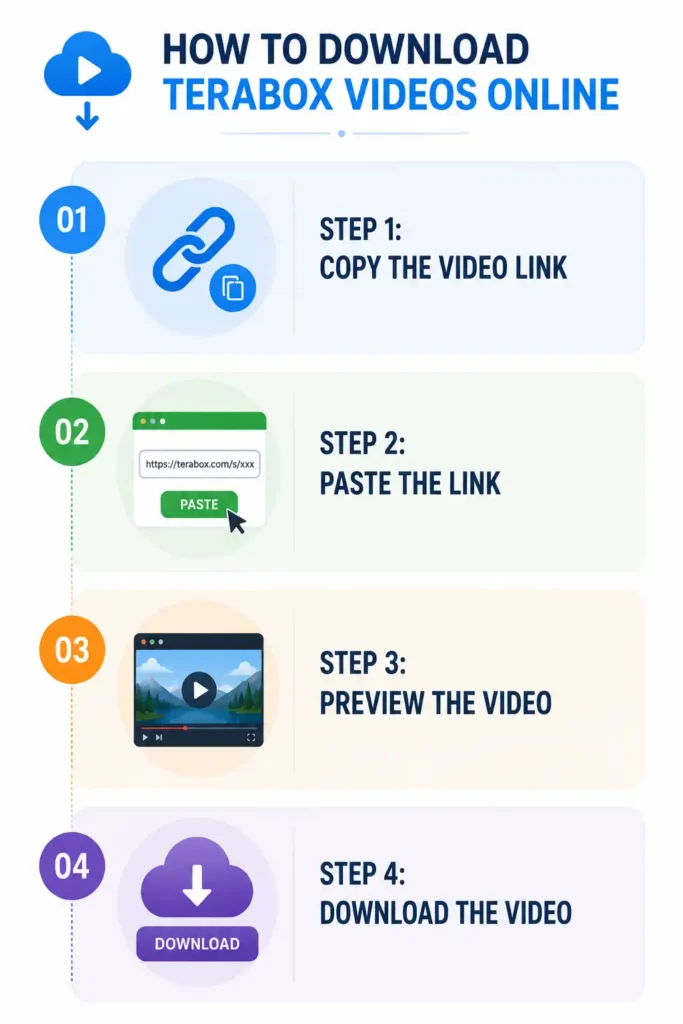
Downloading a TeraBox video only takes a few simple steps. You can paste the share link, preview the video, and save it directly to your device.
Step 1: Copy the Video Link
Copy the complete TeraBox share link from WhatsApp, email, or wherever it was sent. Make sure the URL is complete before moving to the next step.
Step 2: Paste the Link
Paste the share link into the downloader’s input box. Once the video is recognized, its available details will appear on the screen.
Step 3: Preview the Video
Use the built-in player to watch the supported video directly in your browser. This lets you check the content before downloading the full file.
Step 4: Download the Video
Select the Download option when you’re ready to save the video. The file will be stored according to your browser and device settings.
Which TeraBox Videos Can You Download?
Most commonly shared video formats can be downloaded through an online TeraBox downloader. The main difference appears when you try to play the saved file on your device.
MP4 Videos
MP4 is one of the most widely used video formats and is generally supported across phones, computers, and browsers. It is usually the easiest format to download and play after saving.
MKV Videos
MKV files can also be downloaded, but playback support varies between devices and browsers. If the video does not open normally, you may need a compatible media player.
MOV Videos
MOV is commonly used for videos recorded on Apple devices. You can download these files normally, although some Android devices may require a compatible player to open them.
Note: If you run into a video link that refuses to open, check our guide on Why Is My TeraBox Link Not Working? for some quick fixes.
Will the Downloaded Video Keep Its Original Quality?
In most cases, the downloaded video should retain the quality of the original file. A 1080p video will remain 1080p, while a lower-resolution upload cannot become sharper simply because it was downloaded through a different tool. If the saved video looks blurry or lower quality than expected, check the original file first. The downloader transfers the available video rather than creating extra detail that was not present in the upload.
Common Video Playback Problems
Even when a TeraBox video is available, playback can sometimes behave differently depending on the browser, device, or video format. These quick checks can help when the built-in player does not play the video as expected.
Black Screen
A temporary browser issue can sometimes cause a blank player. Refresh the page first, and if the problem continues, try opening the link in another updated browser.
Video Keeps Buffering
Buffering usually happens when the connection cannot load the video smoothly. Pause other downloads, close unnecessary tabs, or switch to a more stable connection before trying again.
Unsupported Format
Some browsers and devices have limited support for certain video formats. If the video does not play in the browser, download it first and open the file with a compatible media player.
Is It Safe to Download TeraBox Videos Online?
The download itself does not change the video or add anything to the original file. What matters more is whether you know where the shared video came from and whether you expected to receive it. For a video from someone you trust, you can preview it with the built-in player before saving it. If the link comes from an unknown source, it is better to check the content first rather than downloading it immediately.
Frequently Asked Questions
Conclusion
Downloading TeraBox videos online can be a convenient option when you simply want to access a shared video without dealing with unnecessary steps. The built-in player also makes it easier to check the video first, especially when you are not sure what the shared link contains. Once you understand the steps, downloading a TeraBox video becomes quick and easy whenever you need to save one.